
start:utils:windows:wallpaperpanorama
Table of Contents
Wallpaper Panorama
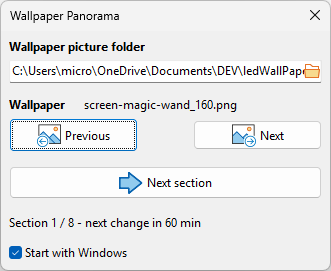
This program automatically changes your Windows wallpaper using wide “triple screen” panoramic pictures (e.g. 5760×1080). Instead of showing the whole picture at once, only a 1920×1080 section is displayed; every hour, a new section is shown, sweeping across the picture from left to right. Once the last section is reached, a new picture is picked at random from your picture folder.
I recommend the website https://digitalblasphemy.com, which offers some great wallpapers.
Or the Imgur website, where you can find free wallpapers.
System tray
Closing the window (✕) does not exit the program: it is minimized to the system tray, where it keeps running and changing the wallpaper every hour. Double-click the tray icon to show the window again, or right-click it for the following menu:
- Show: Restore the main window.
- Next image: Same as the “Next” button.
- Next section: Same as the “Next section” button.
- Quit: Exits the program.
- About: Displays the “About…” window and the release notes.
Example


Download
- WallpaperPanorama.cab Standalone executable (No installation required)
- WallpaperPanorama_Setup.exe Installation Program
Donation

Don't forget to read the END-USER LICENSE AGREEMENT.
start/utils/windows/wallpaperpanorama.txt · Last modified: by stephane