
start:utils:cockpit:p1:cpu:api
Table of Contents
API Configuration
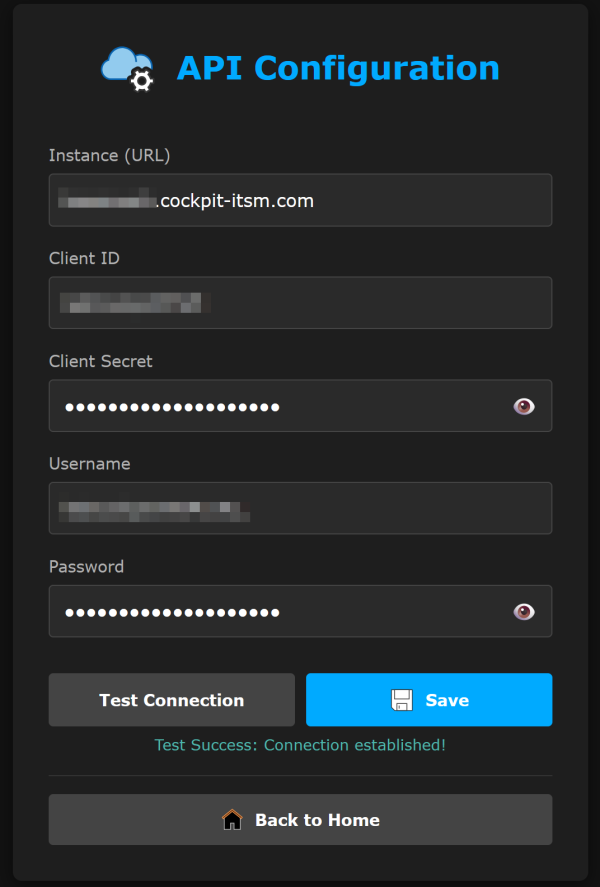
WebCockpitITSM.py
- WebCockpitITSM.py
# WebConfig.py
from datetime import datetime, timezone
from zoneinfo import ZoneInfo

def on_tickets_updated(ui, count):
    """Called after each successful ticket update — notifies the frontend."""
    now = datetime.now(ZoneInfo("Europe/Zurich")).strftime("%H:%M:%S")
    ui.send_message("tickets_updated", {"count": count, "time": now})

def init_index_interface(ui):
    """
    Registers the bridge between index.html and Python logic.
    """

    def handle_status_request(client_id, data):
        """
        Triggered when the frontend sends 'get_api_status'.
        Checks readiness and sends back 'api_status_data'.
        """

        from Tools import check_api_readiness

        is_ready = check_api_readiness()

        print(f"DEBUG: API Readiness requested by {client_id}. Result: {is_ready}")

        # Send the response back to the UI
        ui.send_message("api_status_data", {"ready": is_ready})

    # Register the listener
    ui.on_message("get_api_status", handle_status_request)

    def handle_get_arduino_config(client_id, data):
        from PersistentData import get_config
        ui.send_message("arduino_config", {
            "lcd_backlight":   int(get_config("arduino_lcd_backlight")   or 1),
            "temp_brightness": int(get_config("arduino_temp_brightness") or 7),
            "humi_brightness": int(get_config("arduino_humi_brightness") or 4),
            "co2_brightness":  int(get_config("arduino_co2_brightness")  or 2),
            "ring_brightness": int(get_config("arduino_ring_brightness") or 20),
        })

    def handle_save_arduino_config(client_id, data):
        from PersistentData import save_config
        try:
            for key in ["lcd_backlight", "temp_brightness", "humi_brightness",
                        "co2_brightness", "ring_brightness"]:
                if data.get(key) is not None:
                    save_config(f"arduino_{key}", data[key])
            ui.send_message("arduino_config_saved", {"ok": True})
        except Exception as e:
            print(f"ERROR saving arduino config: {e}")
            ui.send_message("arduino_config_saved", {"ok": False})

    ui.on_message("get_arduino_config",  handle_get_arduino_config)
    ui.on_message("save_arduino_config", handle_save_arduino_config)

    def handle_cleanup_sensor_history(client_id, data):
        try:
            import os, PersistentData as PD
            from influxdb_client import InfluxDBClient
            url    = os.environ.get("INFLUXDB_URL",   "http://dbstorage-influx:8086")
            token  = PD.get_config("influxdbToken") or os.environ.get("INFLUXDB_TOKEN", "")
            org    = os.environ.get("INFLUXDB_ORG",   "arduino")
            bucket = os.environ.get("INFLUXDB_BUCKET","arduinostorage")
            client = InfluxDBClient(url=url, token=token, org=org)
            delete_api = client.delete_api()
            start = "1970-01-01T00:00:00Z"
            stop  = datetime.now(timezone.utc).strftime("%Y-%m-%dT%H:%M:%SZ")
            delete_api.delete(start, stop, "", bucket=bucket, org=org)
            client.close()
            print("INFO: Sensor history cleared.")
            ui.send_message("cleanup_done", {"ok": True,  "label": "Sensor history"})
        except Exception as e:
            print(f"ERROR clearing sensor history: {e}")
            ui.send_message("cleanup_done", {"ok": False, "label": "Sensor history"})

    def handle_cleanup_ticket_history(client_id, data):
        try:
            import PersistentData
            PersistentData.db.execute_sql("DELETE FROM history")
            print("INFO: Ticket history cleared.")
            ui.send_message("cleanup_done", {"ok": True,  "label": "Tickets history"})
        except Exception as e:
            print(f"ERROR clearing ticket history: {e}")
            ui.send_message("cleanup_done", {"ok": False, "label": "Tickets history"})

    ui.on_message("cleanup_sensor_history", handle_cleanup_sensor_history)
    ui.on_message("cleanup_ticket_history", handle_cleanup_ticket_history)
CockpitTSM.html
- CockpitTSM.html
<!DOCTYPE html> <html> <head> <meta http-equiv="content-type" content="text/html; charset=UTF-8"> <meta name="viewport" content="width=device-width, initial-scale=1.0"> <title>P1 Notifications 4 Cockpit ITSM - API Configuration</title> <link rel="stylesheet" href="style.css"> <link rel="icon" type="image/x-icon" href="img/favicon.ico"> </head> <body> <div class="container"> <header style="display: flex; flex-direction: row; align-items: center; justify-content: center; margin-bottom: 30px; gap: 15px;"> <h1 style="margin: 0; color: #00aaff; border: none; font-size: 1.8rem;"><img src="img/cloud-filled-gear.svg" alt="API Icon" style="width: 48px; height: 48px;"> API Configuration</h1> </header> <form id="configForm"> <div class="form-group"> <label for="instance">Instance (URL)</label> <input type="text" id="instance" name="instance" placeholder="https://your-instance.cockpit-itsm.com" value=""> </div> <div class="form-group"> <label for="clientId">Client ID</label> <input type="text" id="clientId" name="clientId" value=""> </div> <div class="form-group"> <label for="clientSecret">Client Secret</label> <div class="password-wrapper"> <input type="password" id="clientSecret" name="clientSecret"> <span class="toggle-password" onclick="togglePassword('clientSecret')"><img src="img/eye.svg" style="width:18px;height:18px;"></span> </div> </div> <div class="form-group"> <label for="username">Username</label> <input type="text" id="username" name="username" value=""> </div> <div class="form-group"> <label for="password">Password</label> <div class="password-wrapper"> <input type="password" id="password" name="password"> <span class="toggle-password" onclick="togglePassword('password')"><img src="img/eye.svg" style="width:18px;height:18px;"></span> </div> </div> <div class="form-group"> <label for="influxdbToken">InfluxDB Admin Token</label> <div class="password-wrapper"> <input type="password" id="influxdbToken" name="influxdbToken" placeholder="xxxxxxxx-xxxx-xxxx-xxxx-xxxxxxxxxxxx"> <span class="toggle-password" onclick="togglePassword('influxdbToken')"><img src="img/eye.svg" style="width:18px;height:18px;"></span> </div> </div> <div class="button-group"> <button type="button" id="btnTest" class="btn-secondary">Test Connection</button> <button type="button" id="btnSave" class="btn-primary"><img src="img/save.svg" alt="" class="btn-icon">Save</button> </div> </form> <div id="statusMessage" class="status-message"></div> <div class="navigation-group" style="margin-top: 1rem; border-top: 1px solid #333; padding-top: 1rem; text-align: center;"> <a href="Config.html" class="btn-secondary" style="width:100%;"> <img src="img/gear-filled.svg" alt="" class="btn-icon">Back to Configuration </a> </div> </div> <script src="libs/socket.io.min.js"></script> <script src="app_cockpit.js"></script> </body> </html>
app_cockpit.js
- app_cockpit.js
// app_cockpit.js
// const socket = io(`http://${window.location.host}`);
const socket = io();

function getFormData() {
  return {
    instance:      document.getElementById('instance').value,
    clientId:      document.getElementById('clientId').value,
    clientSecret:  document.getElementById('clientSecret').value,
    username:      document.getElementById('username').value,
    password:      document.getElementById('password').value,
    influxdbToken: document.getElementById('influxdbToken').value
  };
}

function togglePassword(fieldId) {
  const field = document.getElementById(fieldId);
  field.type = field.type === "password" ? "text" : "password";
}

document.getElementById('btnTest').onclick = function() {
  socket.emit("test_cockpit_connection", getFormData());
  const status = document.getElementById('statusMessage');
  status.innerText = "Testing...";
  status.style.color = "#bb86fc";
};

document.getElementById('btnSave').onclick = function() {
  const data = getFormData();
  console.log("Saving data:", data);
  socket.emit("save_cockpit_config", data);
};

socket.on("connect", () => {
  console.log("Connected to server");
  socket.emit("get_current_config", {});
});

socket.on("connect_error", (err) => {
  console.error("Connection error:", err);
});

socket.on("cockpit_response", function(data) {
  const status = document.getElementById('statusMessage');
  status.innerText = data.message;
  status.style.color = data.success ? "#4db6ac" : "#e57373";

  if (data.success && data.redirect) {
    let secondsLeft = 5;
    status.innerText = data.message + " Redirecting in " + secondsLeft + "s...";

    const countdownInterval = setInterval(() => {
      secondsLeft--;
      if (secondsLeft > 0) {
        status.innerText = data.message + " Redirecting in " + secondsLeft + "s...";
      } else {
        clearInterval(countdownInterval);
        window.location.href = "index.html";
      }
    }, 1000);
  }
});

socket.on("current_config_data", function(data) {
  if (data) {
    document.getElementById('instance').value      = data.instance      || "";
    document.getElementById('clientId').value      = data.clientId      || "";
    document.getElementById('clientSecret').value  = data.clientSecret  || "";
    document.getElementById('username').value      = data.username      || "";
    document.getElementById('password').value      = data.password      || "";
    document.getElementById('influxdbToken').value = data.influxdbToken || "";
  }
});
start/utils/cockpit/p1/cpu/api.txt · Last modified: by admin_wiki