
start:utils:cockpit:p1:cpu
Table of Contents
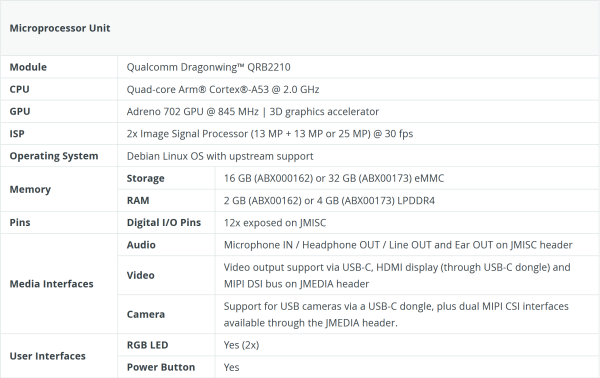
Microprocessor Unit
On accède à la carte Arduino Q avec Arduino App Lab. Une fois la carte mise à jour, il faut créer un nouveau projet. Je l'ai appelé “P1Notification4CockpitITSM”.
Bricks
Il faut ensuite ajouter 3 briques au projet:
- Database - SQL - Ce module permet de gérer facilement les bases de données SQLite et offrent une interface simple pour créer des tables, insérer des données et gérer les connexions à la base de données.
- Database - Time Series - Ce module permet de gérer facilement une base de données InfluxDb qui gère automatiquement l'agrégation des données
- WebUI - HTML - Ce module est un serveur web simplifié et intégrable, conçu pour héberger des applications frontales et mettre à disposition des API ou des canaux de communication WebSocket.
Structure du programme
┌──────────────────────────────────────────────────────────────┐
│                       Arduino App Lab                        │
│                                                              │
│  main.py ──► CockpitITSM.py ──► API Cockpit ITSM             │
│     │                                                        │
│     ├──► WebIndex.py         ──► index.html (dashboard)      │
│     ├──► WebConfig.py        ──► Config.html (navigation)    │
│     ├──► WebCockpitITSM.py   ──► CockpitTSM.html             │
│     ├──► WebOrganizations.py ──► Organizations.html          │
│     ├──► WebStatus.py        ──► Status.html                 │
│     ├──► WebPriority.py      ──► Priority.html               │
│     ├──► WebCriticity.py     ──► Criticity.html              │
│     ├──► WebTeams.py         ──► Teams.html                  │
│     ├──► WebTickets.py       ──► Tickets.html                │
│     └──► WebConfig.py        ──► Arduino.html                │
│                                                              │
│  PersistentData.py ──► cockpit_config.db (SQLite)            │
│  PersistentData.py ──► InfluxDB (TimeSeriesStore, 90j)       │
└──────────────────┬───────────────────────────────────────────┘
                   │  Python → Arduino
                   │  get_open_tickets, get_datetime, get_arduino_config
                   │
                   │  Arduino → Python
                   │  store_sensor_data
                   │
             ┌─────▼───────┐
             │  Arduino Q  │
             │  sketch.c   │
             └──────┬──────┘
                    │
       ┌────────────┼───────────────────────────┐
       │            │                           │
       │ I2C 0x42   │ I2C                       │ GPIO/SPI
       │            │                           │
┌──────▼──────┐  ┌──▼──────────┐         ┌──────▼───────────────┐
│  ESP32-C3   │  │  SCD4x      │         │ Afficheurs           │
│ SuperMini   │  │  CO2/T/H    │         │ TM1637 ×3 (7-seg)    │
│─────────────│  └─────────────┘         │ MD_Parola (matrice)  │
│ Ring 120 LED│                          │ LCD I2C (debug)      │
│ DFR0299 MP3 │                          └──────────────────────┘
└─────────────┘
start/utils/cockpit/p1/cpu.txt · Last modified: by admin_wiki